10 Best Obsidian Alternatives in 2026: Local, Open-Source & AI Picks

已更新:9月16日

The best Obsidian alternatives are not all trying to replace the same part of Obsidian. Some offer local Markdown files and backlinks, while others focus on open-source control, encrypted offline notes, team collaboration, or AI-assisted knowledge retrieval.
This guide compares 10 realistic Obsidian alternatives by data ownership, offline access, linking, migration difficulty, collaboration, and AI features. The best Obsidian alternative for you depends on whether you want to preserve a local Markdown workflow or move to a more structured, collaborative, or automated knowledge system.
Quick answer: choose Logseq or Joplin for local and open-source note-taking; Anytype for encrypted local-first spaces; Capacities for object-based knowledge; Notion or OneNote for collaboration; AppFlowy for an open-source workspace; and remio when the main problem is automatically capturing and retrieving information across files, meetings, email, and web content.
Best Obsidian Alternatives at a Glance
Alternative | Best for | Main tradeoff |
remio | Automatic capture and AI retrieval across files, meetings, email, and web content | Not a drop-in Markdown vault editor |
Notion | Shared docs, databases, projects, and team knowledge | Cloud workspace model; offline access requires downloaded pages |
Evernote | Web clipping, scanning, attachments, and search | Less local-file control than Obsidian |
Capacities | Object-based, linked personal knowledge with a gentler setup | Notes live in the app database, not accessible Markdown folders |
Tana | Structured nodes, meetings, AI actions, and connected work | Not local Markdown; strongest current focus is meeting and team workflows |
Logseq | Local outliner, backlinks, queries, and open-source customization | Block-first workflow and sync setup require adjustment |
Joplin | Open-source Markdown notebooks with flexible encrypted sync | Less graph-centric and less polished than Obsidian |
OneNote | Free-form notebooks, handwriting, and Microsoft collaboration | Cloud-connected notebook format rather than plain local files |
AppFlowy | Open-source docs, databases, offline use, and self-hosting | More workspace-oriented than a mature graph-based PKM system |
Anytype | Local-first, encrypted, offline spaces and data ownership | Object model and recovery-key workflow have a learning curve |
How we evaluated these alternatives
The best replacement depends on the part of Obsidian you value—or the part you want to escape. This comparison uses five practical criteria:
Data ownership and portability: Can you keep local files, export standard formats, or self-host?
Offline behavior: Can you keep working without a connection, and which features stop offline?
Linking and structure: Does the tool support backlinks, graph navigation, blocks, objects, or databases?
Capture and AI: Does it help collect information, search existing knowledge, transcribe meetings, or act on context?
Collaboration and maintenance: Can a team work together without relying on a fragile plugin stack?
No app wins every category. A tool that is easier for a team may provide less file-level control. A local-first tool may require more setup. An AI-heavy product may send selected context to a configured model. Treat privacy as a complete data path, not a marketing label.
1. remio — best for automatic capture and AI retrieval

remio is the most relevant option when your real problem is not writing Markdown but collecting and finding work context. It can capture article-like web pages, index local folders and files without uploading the originals, transcribe meetings, and connect supported email or messaging sources into a searchable knowledge base.
Compared with Obsidian, remio reduces manual filing and linking. Its strength is asking questions across files, meetings, saved pages, and communications, then using that context for research or other AI-assisted work.
Choose remio if information arrives faster than you can organize it. Think twice if you want a transparent folder of Markdown notes that you edit with any text editor. The full desktop experience currently depends on supported Windows or Apple-silicon Macs, and cloud models may still be used for some AI tasks even though core files and indexing stay local.
Migration note: keep an untouched backup of the Obsidian vault. remio supports Markdown import and local folder/file sources, but plugin-specific views, CSS, Dataview queries, and Canvas behavior should be tested separately.
2. Notion — best for teams and structured projects

Notion combines pages, databases, projects, wikis, permissions, and collaboration. It is a better fit than Obsidian when several people need to update the same operational knowledge, assign work, build database views, or manage permissions without configuring plugins.
Notion now supports downloaded pages for offline use in its desktop and mobile apps. That is useful, but it is not the same as owning a normal folder of Markdown files. Individual pages may need to be marked for offline access, and some advanced blocks, AI features, sharing controls, and large database views still depend on a connection.
Choose Notion for shared systems of record and project workflows. Stay with Obsidian if plain files, deep local customization, or offline-by-default access to the entire vault is the priority.
Migration note: test databases, nested pages, attachments, backlinks, formulas, and exports with a small workspace before moving the full vault.
3. Evernote — best for clipping and searchable reference material

Evernote remains strong at capturing web pages, PDFs, scans, images, attachments, tasks, and calendar-linked notes. Its Web Clipper and search across documents and images can be more useful than a graph when your system is primarily a reference archive.
The current product includes a free tier and paid plans, with plan limits that can change. That is why this guide does not hard-code a monthly price. Check the official comparison page for current device, note, notebook, storage, offline, and AI limits.
Choose Evernote when capture and retrieval matter more than local Markdown ownership. Choose Obsidian, Joplin, or Logseq instead if you want an open file-based workflow or extensive local customization.
Migration note: verify that attachments, internal links, tags, OCR-dependent search, and export formats survive a representative test.
4. Capacities — best for object-based networked notes

Capacities organizes knowledge as objects such as people, books, projects, meetings, and ideas. Each object can have properties, templates, views, backlinks, and local graph exploration. This gives structured knowledge without requiring users to build a large plugin stack.
Capacities has a free core product, synchronization, import/export, and offline support. Its offline model has important limits, and its notes live inside the application database rather than as directly accessible Markdown files in folders. The product provides exports, but it is not a local-file clone of Obsidian.
Choose Capacities if you like connected notes but want a more guided, object-centered system. Stay with Obsidian if editing the same Markdown files with multiple tools is non-negotiable.
Migration note: test Markdown export, object properties, attachments, backlinks, and the difference between a global Obsidian graph and Capacities' local object graph.
5. Tana — best for structured nodes and meeting workflows

Tana uses nodes and structured types to connect notes, meetings, tasks, and operational context. Its current product direction emphasizes meeting memory, AI follow-up, integrations, and a context graph rather than a traditional local note vault.
Choose Tana if meetings create much of your knowledge and you want structured follow-through from the same system. It can also suit people who enjoy outline-style capture and reusable schemas.
Do not choose it merely because you want a simpler Obsidian. Tana has its own data model, AI limits, plans, and workflow assumptions. It is not a plain local Markdown application.
Migration note: test exports, links, attachments, recurring structured fields, and how your Obsidian folders or frontmatter map to Tana nodes and types.
6. Logseq — best for a local open-source outliner

Logseq is one of the closest alternatives for users who value backlinks, local files, graph navigation, queries, tasks, plugins, and open-source development. Its default experience is block-first and journal-driven, which feels different from Obsidian's file-and-page orientation.
Choose Logseq if daily notes, outlining, block references, queries, and local Markdown or Org-mode files match how you think. The learning curve shifts from Obsidian plugins and folders toward blocks, indentation, and graph conventions.
Sync deserves a careful pilot. Do not place the same graph in multiple independent sync systems or assume every Obsidian plugin construct will behave identically.
Migration note: duplicate the vault, test links and frontmatter, and confirm that files remain compatible before changing the production copy.
7. Joplin — best for open-source Markdown notebooks

Joplin is a free, open-source, offline-first note and to-do application. Notes use Markdown, and the apps support notebooks, tags, search, attachments, plugins, themes, a web clipper, and several synchronization options. End-to-end encryption can be used for supported sync paths.
Joplin is less graph-centric than Obsidian, but it is often easier to explain as a conventional notebook. It is a strong choice for people who want open-source software and Markdown without building a complex linked-thinking environment.
Choose Joplin for durable notes, multiple platforms, and flexible sync. Choose Obsidian or Logseq if graph exploration and dense backlink workflows are central.
Migration note: test Obsidian-flavored Markdown, wiki links, frontmatter, embedded files, Canvas files, and plugin syntax. Joplin's rich-text editor also has limitations when notes rely on nonstandard Markdown plugins.
8. Microsoft OneNote — best for free-form notebooks and handwriting

OneNote offers free-form pages, notebooks and sections, drawing, handwriting, audio, clipping, and collaboration across Microsoft-connected devices. Supported versions are free to download and use, while some premium features depend on Microsoft 365.
OneNote is easier than Obsidian for spatial pages, pen input, class notebooks, and shared Microsoft workflows. It is weaker for users who want plain local files, Git-friendly notes, or a community plugin ecosystem.
Choose OneNote when visual note placement and Microsoft collaboration matter more than Markdown portability.
Migration note: test owned and shared notebooks separately, keep the Obsidian backup, and confirm attachments, links, tables, handwriting, and exports before switching.
9. AppFlowy — best for an open-source workspace
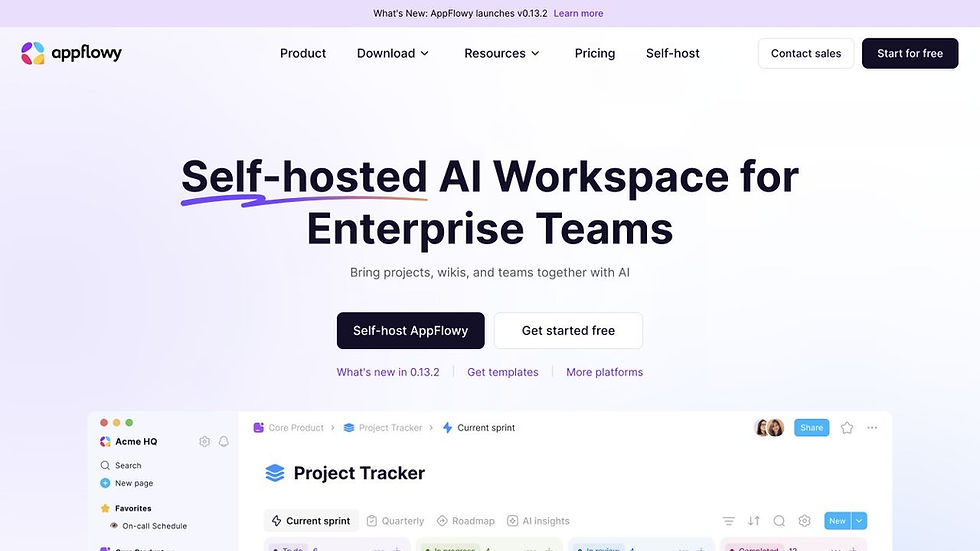
AppFlowy is an open-source workspace for documents, databases, projects, and AI-assisted work. It supports offline use, local AI options, mobile and desktop applications, and self-hosting for teams that want more control over deployment and data.
It competes more directly with Notion than with Obsidian's mature graph-based PKM ecosystem. That can be an advantage if you want databases and team workflows, but it may disappoint users looking for a direct local Markdown vault replacement.
Choose AppFlowy for an open-source workspace with offline and self-hosting options. Choose Logseq or Joplin if notes and backlinks are more important than collaborative databases.
Migration note: test document hierarchy, databases, Markdown import/export, attachments, and self-hosted sync before committing.
10. Anytype — best for encrypted local-first spaces

Anytype is local-first, offline-first, and end-to-end encrypted by default. Content is stored on-device first, and users can use the managed network, local peer-to-peer sync, a self-hosted backup node, or local-only mode depending on their setup.
Its object-and-space model is more structured than a folder of Markdown files. Recovery keys, encryption, sync choices, and object types provide control, but they also require users to understand a different mental model.
Choose Anytype when privacy, offline access, and local-first ownership matter more than direct file-system editing. Stay with Obsidian if transparent Markdown files and the plugin ecosystem are the primary reasons you use it.
Migration note: test the current Anytype importer and exporter with a copied vault. Check links, nested folders, properties, attachments, and recovery procedures before deleting anything from Obsidian.
How to Choose the Best Obsidian Alternative
Best Obsidian Alternatives by Use Case
Choose Logseq for a local, open-source outliner with backlinks and queries.
Choose Joplin for conventional open-source Markdown notebooks and flexible sync.
If you are comparing open-source note-taking apps, Logseq and Joplin are the closest options in this list. Logseq is better suited to outlines, blocks, backlinks, and graph-based thinking, while Joplin offers a more conventional notebook structure with Markdown support and flexible sync.
Choose Anytype for encrypted local-first spaces and offline ownership.
Choose Capacities for object-based networked notes with less plugin setup.
Choose Notion for databases, shared docs, projects, and team permissions.
Choose OneNote for handwriting, free-form pages, and Microsoft workflows.
Choose Tana for structured nodes and meeting-to-action workflows.
Choose AppFlowy for an open-source collaborative workspace and self-hosting.
Choose Evernote for web clipping, scanning, attachments, and search.
Choose remio when you need automatic capture and AI retrieval across many knowledge sources.
People searching for an Obsidian Copilot alternative may not need to replace Obsidian itself. If the vault structure still works, an AI plugin may be sufficient. Switch to an AI-native knowledge tool only when you need automatic capture, cross-source retrieval, meeting context, or less manual vault maintenance.
How to migrate safely from Obsidian
Do not move the only copy of your vault directly into another product.
Create a complete backup. Copy the entire vault, including `.obsidian`, attachments, Canvas files, and hidden configuration files.
Inventory plugin-dependent content. List Dataview queries, custom callouts, Tasks syntax, Canvas boards, CSS snippets, templates, and embedded local files.
Choose a representative pilot. Test 30–50 notes covering normal pages, long notes, nested folders, frontmatter, backlinks, attachments, tables, and unusual plugin syntax.
Check the destination's data model. Decide how Obsidian folders, tags, properties, links, and daily notes map to notebooks, blocks, objects, spaces, or databases.
Verify export before import. A product is not portable merely because it has an export button. Open the exported files and inspect text, links, metadata, images, and filenames.
Run both systems temporarily. Use the new app for real work while keeping Obsidian read-only. Record what requires manual repair.
Switch only after recovery is proven. Confirm that you can restore both the original vault and a clean export from the new tool.
When should you stay with Obsidian?
Stay with Obsidian if you value local Markdown files, a large plugin ecosystem, deep customization, backlinks, Canvas, and the ability to edit the same notes with ordinary file tools. Difficulty during setup is not automatically a reason to migrate; sometimes removing unnecessary plugins and simplifying the vault is cheaper than moving years of knowledge.
Switch only when another tool solves a recurring problem that Obsidian does not solve well enough: team permissions, automatic capture, managed databases, encrypted local-first spaces, handwriting, simpler sync, or AI that works across a broader set of sources.
FAQ
What is the closest alternative to Obsidian?
Logseq is closest for local linked notes, graph navigation, plugins, and an open-source workflow, although it is block-first rather than page-first. Joplin is closer if you mainly want Markdown notebooks and flexible sync. No alternative reproduces every Obsidian plugin and vault behavior.
What is the best open-source Obsidian alternative?
Logseq is a strong choice for linked outlining, Joplin for Markdown notebooks, and AppFlowy for a collaborative docs-and-databases workspace. The best option depends on whether your priority is graph thinking, conventional notes, or team structure.
Is there a free Obsidian alternative?
Yes. Logseq, Joplin, AppFlowy, OneNote, and several other options have free or open-source paths. Capacities, Notion, Evernote, Tana, Anytype, and remio also provide free access or free tiers with different limits. Check each official plan page because limits change.
Which alternative is best for AI?
Choose remio when AI needs context from files, meetings, web content, email, and other captured sources. Choose Tana for structured meeting and task workflows, Notion for AI inside a collaborative workspace, or Capacities for AI inside object-based personal knowledge. AI quality, privacy, cost, and offline behavior differ by provider and plan.
Which alternative is best for privacy and offline work?
Anytype is designed around encrypted local-first spaces. Joplin is offline-first and supports encrypted synchronization options. Logseq works with local Markdown or Org-mode graphs. Obsidian itself remains an excellent privacy-oriented choice because its vault is stored locally as plain files. Review sync, backups, plugins, telemetry, and AI endpoints—not only the location of note text.
Can I import my Obsidian vault directly?
It depends on the destination and the features used in your vault. Standard Markdown usually travels better than Dataview queries, Canvas files, custom embeds, plugin syntax, CSS, or unusual frontmatter. Always import a copy, test representative notes, and verify the destination's export before switching.